Sweeping up
I've learned a lot running this REW program and getting advice from the Home Theater Shack.
Here's what you want with a subwoofer: low frequencies with a 'ht' sound. This means that low bass is going to be louder than mid bass because how we hear depends on the frequency.
My 18" drivers have surprisingly good range- they seem to love the 100Hz range. Problem is- that frequency is directional. Everything over 80 is pretty much, so the subwoofer is confined to low frequencies- and you let your mains do the rest.
On advice, I set all my speakers to 'small'. This means the receiver should only send low frequencies to the subwoofer channel. I also set the crossover frequency to 100Hz- this is the point where the receiver tries to transition from the sub to the mains.
Here's what my mains only look like:
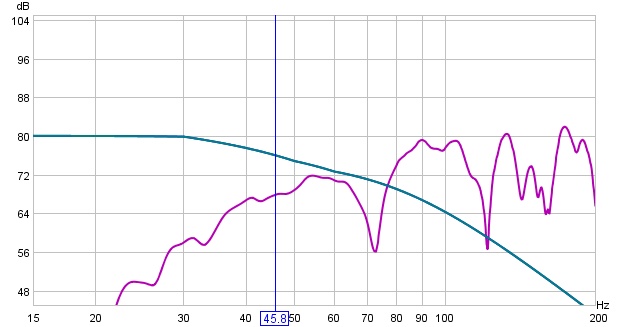
Here is what the sub by itself looks like (unfiltered):

And after a bit of fiddling, here's what the sub is by itself with several filters enabled.

I've saved my filters as 'FP6'. Heck, I'll store the file here: fp6.req
If you see, I had to really force the curve downward. This is even with the receiver allegedly trying to do its own crossover.
I try to match to a curve set for subwoofers- but with a 'house curve' thrown in. The intent is that sound at 30Hz should sound about the same as at 80. For that to happen, low frequencies needed boosting. If you look at the dark blue line above you can see that it isn't a perfect curve due to the house curve.
Now, let's see what happens when I add my mains back in.

Well, something weird has happened- with the mains added, the output is lower in some parts of the range. That's probably because of phase. Don't see it lower? Look here with all of them combined.

The black line is the combined signal. You can see it tracks the sub at low frequencies (<50) style="color: rgb(51, 102, 255); font-weight: bold;">mains at high (>100), but in that crossover region, it is lower than both.
posted by Farzanegan @ 2:33 PM
0 comments
links to this post

