Home Theater

Saturday, December 26, 2009

Some upgrades

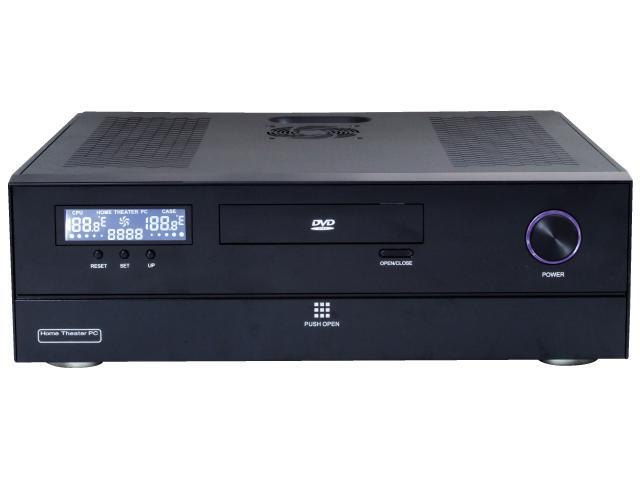
The need to watch A Christmas Story in High Def made me dust off the HTPC again.  Somehow in its dormancy it lost the ability to do 5.1 and it broke the bracket for the heat sink.  I have no idea how either one happened, but the heat sink issue shows how far good brands have fallen with their migration of components to China.   The mobo is an Asus M2NPV-VM, which had a good set of features, but something as simple as the plastic bracket the heatsink mounts to being of poor quality sidelined movie night.  We tried watching Ralphie and friends- and had just gotten past when Flick sticks his tongue to the flagpole when the screen went blue.  Not the BSOD, but the projector showing no image.  I restarted the PC and it happened again.    Whenever something wacky like this happens, I suspect heat, and when I popped open the case, the heatsink on the CPU was loose- because of cheap plastic.  I'm not sure what the proper repair is- probably finding a new CPU heatsink bracket and mounting it.  But the mobo would have to come out, and I"m not sure where you find just a bracket for an AM2 socket, so I got out my racing safety wire and pliers and that sucker is on there well now.

Speaking of heat- while poking around my EP2500 was hot- too hot to the touch.  That can't be good.  I had done a trick of putting in a very quiet fan, and reversing it- so it pulled in cool air from the room and vented it out the back.  What it seemed to do was clog the front filter with dust.  I assume the hot case for the amp was due to lack of airflow.  After cracking it open, I'm not so sure.  I went ahead and restored the direction of the fan flow (pulls behind the amp, and vents out front), but I didn't feel any flow.  I crack open the amp case again, and I suspect my 2 year old had been doing modifications as he is apt to do.  I found a twist-tie stuck in the fan shroud, preventing it from moving.  I thought for sure the fan would be burned out, but it spun right up when I cleared the obstruction.

When testing out the sound, I noticed some drops during speech of the movie.  I wasn't sure if it was the receiver or the PC that was not processing the signal correctly, but the receiver certainly did over the SPDIF port of the HD DVD player.  I started playing with the PC and got stumped.  I finally had to revert the PC to do 2-channel sound to get decent playback.  Tonight I found some updated drivers for the onboard soundcard and have 5.1 again.

I still have one more issue to chase down- that of the input to the sub.  My Behringer BFD shows the input as being maxxed out.   I assume as I was pulling and reinstalling the amp that something got knocked loose for the inputs.  I'm using balanced cables between the BFD and the EP2500, but the subwoofer output on the receiver is just mono and I need to chase down that cabling.  Should be easy enough to do.

But the big news of the day (Christmas) is that a buddy of mine bought me a Blu-Ray player.  He's a theatreophile as well (many of my ideas for my home theater came from his excellent setup). Having recently moved, he's without theater and we've had him over for movies all the time.  He decided to upgrade me to BR since I'm still angry from the loss of HD DVD, so this was going to be the only way he got to see high-def again.  I need to reprogram the remote to handle the new device, and need to figure out how to get additional component inputs, but we watched our first movie on it tonight. Very nice.  Thanks Brian!

Labels: ,

Friday, October 16, 2009

'NAT' Network-attached-tuner

The HDHomeRun is the coolest device in your high-tech home theater.

Imagine a dual-tuner card you'd stick in your PC that can tune both OTA and cable-company encoded-but-not-encrypted QAM. Dual tuners means you can watch one station and record on a different one (if you have the right software).

Imagine also that it came with great software (Arcsoft Total Media). And fast channel locking- and built-in EPG, and high-output bitstreams for the two channels.

For $150.

Great deal, right?

How about this- it doesn't go in your PC at all. So not you're thinking.. it's a component that goes in my rack. Well it can.. but it can also go anywhere. The picture fools you into thinking it is something bigger than it is.

It's the size of a paperback book. And it only has 2 input jacks, 1 ethernet port and a power plug.

Meaning, it is a fully networked device allowing any- and all PCs in your network to access the tuner itself. Please realize the distinction between this and a 'media center' where you stored your movies- this device actually outputs live video streams- two of them- that can be shared simultaneously by all the deviceces in your network (where upon you could do the traditional media center functions with a networked PC).

I am thrilled with it. It's not an easy setup- documentation is scarce- but it works wonderfully.

Labels:

Saturday, August 22, 2009

Back to looking for HD DVD playback software

htI've been playing HD DVD movies with my Toshiba HD DVD player- which does a fantastic job. However, for mixed-media, I really want to get my HTPC going again. It should do everything, right? Playback software for HD DVD is not common- but oddly- there are probably more choices now than when HD DVD was still viable. Below are the software I have heard work:

  • Arcsoft Total Media Theater. Though the website doesn't mention it, I have it on good authority that it does work.
  • PowerDVD. I have an old version that actually works. The software is pretty clunky, but I have used it. The new version has dropped HD DVD.
  • Corel WinDVD. Supposedly even the latest version supports HD DVD
  • Nero 8 with BD plugin. The latest version of Nero (9) does not support it, but 8 may still be available.
I'm leaning towards Arcsoft's TMT3, as it was recommended by an HTPC person (who also share a fondness for AMD processors).

Labels:

Sunday, November 25, 2007

QAM

Apparently, I can bypass my antenna altogether and get HD local broadcasts using the cable. I read a blog about a local guy doing just that, but he doesn't seem too impressed. My Samsung HDTV tuner can do QAM as well as NTSC, so we'll see how it works for me.

On the antenna front, I hooked up a big antenna in the attic and still didn't get much for channels. I tried the amp Darrylo gave me and I don't think it made a difference either.

The reason for this recent activity is that I'm getting closer to revitalizing the HTPC to get HD DVD using (temporarily) an XBOX HD drive. Since I already have an HD A2 and an OTA HDTV tuner, I'm not getting anything new other than DVR for the HDTV stuff, and perhaps a simplified setup (and no BS 'won't upgrade your DVDs over component').

This week I'll give the Samsung a try.

Labels: ,

Monday, October 29, 2007

Reviving the HTPC

I gave up on the HTPC because of lousy software for DVR and Over-the-Air High definition. I bought an over-the-air receiver for $40 and it is great (it still isn't a DVR, but I don't have the frustration of debugging ATI software releases).

However, there are two more reasons for HTPC
  • Network storage of DVD images
  • High-quality DVDs to my projector
I've discussed these on the forums of Home Theater Shack and when digging around for information on how I could hook up my Dreamcast (VGA), I stumbled back upon articles about upscaling.

I'm going to look in to RatDVD to store DVD images, since this format keeps the DVD menus and high quality sound, but in 1/4 the space by re-compressing the image stream in a newer format. This should be easier than swapping DVDs all the time.

The other reason has to do with upconversion. A little background: DVDs are a format stored at 480p. That means there are 480 lines of information available to be displayed. Most projectors are far higher than that, my own has 768 lines of resolution. These same projectors usually attempt to fill the full image by doing some amount of interpolation of images so you get the full size screen. This works well enough. However, when (my) projector gets this image, it is in analog format and with so much information it can only scan this signal so fast before it just gives up and punts, which means a soft image. But, DVDs are stored as a digital format- a series of scene descriptions which are converted into the analog signal. At the DVD player itself, if this interpolation was done before analog, knowing the output to 720p or other format, it would result in a much clearer picture (because it avoids 'generation loss').

Indeed, there are 'upconverting' DVD players which do just this. My Philips player does this. Except not over component- only HDMI. There must be some technical reason for this. Wait a minute, component can handle 1080p. Turns out there is no technical reason for this at all. It is a Hollywood restriction. For some inane reason, it was done to prevent piracy. Which means that the DVD that I own cannot be viewed on the equipment that I own using the better image processing of equipment that I own. Smells like a lawsuit, or a DMCA exception. Indeed, there are players outside of Hollywood's Iron Curtain which play upconverted content: Oppo, NeuNeo, etc. I don't see any reason to go buy yet another DVD player when the one I have does this same thing, but has component HD output disabled. It makes no sense at all- Hollywood doesn't benefit from me buying a new projector that accepts HDMI, and I cannot imagine a casual users (or even a hardcore one) bothering to upscale their DVD, output to analog, then somehow capture this (analog) and re-encode it to save it as high-def. They're probably targeting some fly-by-night shop in Singapore who might have this equipment, but inconveniencing millions of valid users of this technology. The MPAA sucks.

Update: some clever guys have made an HDMI converter! Sweet! In-line, and external.

Which brings me back to HTPC. It turns out that PCs can play DVDs. Out their VGA port. Oh- and by the way- the PC, with its wealth of horsepower, can upscale an improve images amazingly so. And, by the way- over VGA, which is superior to component! I can output images at 1600x1200, no problem. Oh- and if I had to, since VGA is an analog signal, I could make component cables.

I don't have to, since my projector accepts VGA (like many other do).

Therefore, the HTPC is getting revived. Stay tuned.

(BTW, Vista won't let you do this- it only allows protected content out an HDMI video port)

Labels:

Tuesday, October 02, 2007

REW again

One thing for any sub is that your room will have an effect on low-frequency sounds. To compensate for this, some high-end receivers can send and 'hear' sounds and do some amount of equalization.

None of them can approach the Room Equalization Wizard which is used in conjunction with a PC which plays a variety of sounds, sweeps, etc. Hook the PC output to the input of your sound system, and hook up a soundmeter to the line input. With the right cables, it can also program something like the BFD (DSP1124) with multiple filters to tune it right to your room.

As it is, I rebuilding my shuttle to do the work (it has a nice built-in soundcard), though you'd think I would use the HTPC. The HTPC is being used as the girl's PC for the moment mostly because software for HTPC is abysmal.

Labels: , ,

Monday, April 30, 2007

HTPC sidelined by bad... hardware

You'd think after all the trouble I had with software, that would be enough. But nooOooo. When I got the Asus motherboard, it had a burned fan header- not a big deal because there were others I could use. But then, in the midst of installing MCE, the ethernet port goes belly-up.

I call the vendor (zip crap fly) and try to send it for a replacement. "It's more than 30 days, so go through the vendor". I explained that it was bad day-1, but they ignored me. So, I had Amex reverse the charges, and sent the board to Asus. Order from newegg next time.

That was more than a month ago. No motherboard. Their RMA system is broken so you can't even check your status online, so I've been calling every week. Last week they said "something isn't right."- since they guarantee a 10-day turnaround. We'll see the new excuse this week.

The root of the problem, IMHO, is that Asus now builds their products in mainland China. Land of slave labor, child labor, communism, environmental destruction, prisoner organ harvesting and now, crappy computer components.

Asus sucks, Zipzoomfly sucks. And you probably know what I think of mainland China.

Labels:

Tuesday, February 06, 2007

HDTV software

What I hoped would be a moderately difficult install is proving to be more difficult.

I didn't want to use the ATI HDTV software because it was very buggy. So, I'm going to attempt to use other tuner software.

GBPVR

Seems to be very popular. However, it's interface is something only the author could love. Then again, it is free. It goes through a complex setup for getting the tuner selected, and also the EPG (electronic program guide). That EPG required registering for an XML download of tv programs. Even so, it turns out that the ATI Wonder isn't compatible with GBPVR for channel information. For some reason, the ATI HDTV card doesn't send all the tuner information, so you have to enter it manually using some crazy software which decodes HDTV streams.

I'm putting this aside for now while I figure out how to do these manual TV channel configuration

WatchHDTV

Unlike GBPVR, this is meant to be just a tuner and recorder for HDTV. It has a tiny download, and just selects the first tuner in the list. It supports the ATI HDTV wonder directly.

But it didn't work. It wants me to use some crazy released-by-microsoft, but not officially released tool called GraphEdit to try to decipher the Directplay stream.

Update: loading the ATI drivers (up to the encoder part) allowed me to tune channels. I still had to manually put in the channel numbers, but then I can tune HDTV. So I know the board is good, anyway.

Got All Media


Claims to work with the HDTV-Wonder(if it works). Downloading now.

Beyond TV


It is nice! It costs money. :-(

Media Portal


An open source media portal device; claims ATI HDTV ability too.

ATI HDTV Wonder


This software is ass. But, considering the game starts in a few hours, I'm going to give it a try. I've made a post entry just on it- and all the versions I've tried.

Labels:

ATI software releases

Apparently, I'm not the only one who is having problems with ATI's HDTV Wonder- or any of their multimedia products (All-in-Wonder, etc.) In fact, I'm not sure I could find anything favorable about them online.

Unlike most software, the fix seems to be to use old(er) software. From ATI's own technical support, they wanted me to downgrade from the latest and greatest. I suspect software outsourcing which would explain their going backwards in quality (I see it firsthand every day).

* 9.16 The latest release but has a 'known bug' of not working with any non-ATI video card. It works on the Shuttle (well, sort of).
* 9.14 The release that ATI wanted me to try. It has a 'can't find language' bogus error. There's a Microsoft bulletin on it, but that didn't work either.
* 9.08 What I'm testing now. Nope, new error, "DSCPR language resource file was not found"

Conclusion: stay away from ATI products

Labels:

Sunday, February 04, 2007

ATI is crap

I'm serious. I wanted to get this setup ready for superbowl- the PC was together, all the components were here, and the crappy ATI software wouldn't work.

I spent EIGHT HOURS installing drivers, googling error messages, restoring the system, reinstalling drivers, downloading drivers. And ended up having to borrow an HDTV tuner. This was a brand-new installation, no other software interfered with it. And it wouldn't work- out of the box. Installation step (four hundred and) three had me install an encoder- which claimed I didn't have any hardware the software supported. So I suppose the fact that it worked with other software, and was in the device list (no error) and even ATI's own other software saw it as an ATI HDTV tuner, didn't really matter.

I had it working for a little using ATI's drivers and an 'WatchHDTV' software. But come gametime... that channel wouldn't tune. So one of my neighbors had to run home and grab his tuner. Everything else was perfect- the sound, the picture, but ATI's software was a disaster.

I'll say it again- ATI is crap. I will avoid it at all costs in the future. And considering that my favorite processor company just bought ATI, I have to question their wisdom. This HDTV tuner is going in the garbage.

Update: Tuner is fine; software is horrible

Labels:

Thursday, February 01, 2007

Don't use Vista for HTPC

It appears that Microsoft has intentionally crippled their new OS so that 'content providers' can decide what you can and can't watch.

Unfortunately- this means that if you have 'high quality' output, Microsoft will intentionally degrade your signal. Yep. Even though you own it, they're going to introduce noise and static. Everything end-to-end has to be 'certified' and 'revokable'. Your sound card, video card, peripherals, everything. The only things supported for this is HDCP. Unfortunately, I'm not aware of any video cards that support it. Even those that claim to will have to have a built-in encryption key- and those aren't even set yet- so they won't work.

The worst part is that people just don't know this. They assume that everything will work- but instead of having more content, they may end up with less. I thought this was pretty well known, but in my day job, I'm an engineer and read this stuff constantly. For over a year now, it has been the online buzz. I guess average Joe just assumes things are peachy. After all, who would assume that you'd go backwards?

I had a hilarious online conversation with a Microsoft employee (I didn't know it until he said so) about this:

Quote:
me>I'm trying to decide if I should use Windows XP or MCE for my HT. I'm going to stay way from Vista because it won't play certain protected content.

fanboy>Where did you hear that Vista will disable protected content??? I haven't heard anything like that. Are you certain about that?

me>(sent links to those sites above)

fanboy>Well, you can buy an HDCP video card.

me>I don't have time to educate you on this. I won't be using Vista.

fanboy>I work at Microsoft in the Windows division. Not sure you could educate me on Vista.

me>Apparently I already did educate you (since you didn't know that Vista won't play protected content). Were you just 'playing' dumb?


According to Microsoft themselves, all the interfaces are going to be protected. Do you hook up your PC to your 5.1 speaker system? You might not be allowed to in Vista if you play 'protected' content- like.. music CDs. Or watch DVDs.

From the Vista Team Blog:

What about S/PDIF audio connections?

Windows Vista does not require S/PDIF to be turned off, but Windows Vista continues to support the ability to turn it off for certain content

Will Component (YPbPr) video outputs be disabled by Windows Vista's content protection?

Similar to S/PDIF, Windows Vista does not require component video outputs to be disabled, but rather enables the enforcement of the usage policy set by content owners or service providers, including with respect to output restrictions and image constraint.

So- don't get Vista thinking it'll have more features for you- until the hardware is 'approved', may end up with less.

Labels:

Tuesday, January 23, 2007

HTPC Trigger pull

Okay, at least partially.

I've ordered the NSK2400 and the Asus M2NPV-VM motherboard.

What remains are
  • Processor
  • RAM (DDR2)
  • Hard drive
I'm kinda hoping that the processor (the low-wattage AMD X2) is going to go down in price soon- supposedly they just had a price decrease and it should show up in the retail channel later. RAM and HDDs show up on specials periodically.

Labels:

Saturday, January 13, 2007

Decided on a case

Actually, I've decided on just about everything- I just won't pull the trigger!

This case is awesome. Quiet, heavy, comes with a power supply:


NSK2400
Okay, now it probably isn't worth going single-core. Chances are more software will want dual core stuff and when we tested my ATI HDTV tuner at New Year's, the CPU was getting hit pretty hard- as well as the disk drive! So, a faster CPU with modern disks should be the ticket.

Dual core means AMD or Intel- with Intel being about twice the price. So I think I'll go with the slowest X2 processor. It's still >$130, but last year it was double that, so... Anyway, then I need RAM- one stick of 1G should be enough for now. Hard drive... I want SATA just for the cool factor- it doesn't hurt that it also is faster. So, I'll be on the hunt for that too.

Let's add it up so far (and this is the reason I'm hesitant).

  • Case. $92
  • CPU. $130
  • MOBO. $90
  • RAM. $100
  • Hard drives. $100.
Let's see- thats.. uh... 2..330..420..512. Ouch. No software either. No keyboard, or DVD drive (I have those).

How is Dell selling this same type internals for $419 with keyboard, dvd drive and XP?

Labels:

Tuesday, November 21, 2006

Three choices

The three options I'm looking at are:

Dell E521:
Dell Dimension E521
  • AMD Athlon™ 64 X2 Dual-Core 3800+
  • Genuine Windows® XP Home Edition
  • 1GB Dual Channel DDR2 SDRAM at 533MHz- 2DIMMs
  • 160GB Serial ATA Hard Drive (7200RPM) w/DataBurst Cache™
  • 16x DVD+/-RW Drive
  • NVIDIA GeForce 6150 LE Integrated Graphics GPU
  • Integrated 7.1 Channel Audio
Pros:
  • Impressive processor- dual-core
  • Includes everything, OS and case
  • High-tech: SATA optical drive, SATA hard drive
  • Assumed to have a quiet PS
Cons:
  • Does not have component- out. My projector can take a direct VGA input, so it isn't a deal-breaker
  • It's a Dell, dude
  • Case would be tossed
Price:
  • $439
  • Case $120
  • $560


Build-your-own

$91.99 $91.99
$88.80 $88.80
$111.00 $111.00

Pros:
  • Fully control each component
  • Has SPDIF and Component-out
  • Drivers and software available
  • Upgradable
Cons:
  • Compared to Dell, not a deal
  • Processor is single-core
Price:
  • $400 + Case + Powersupply, $550


A configured (Linux) system:


Ultra quiet, super small, transformable elegance for Linux and Windows. These system are loaded with features: TV-Out(SVideo and Composite), DVI, Component Video, VGA, Card Reader, Front USB/1394 and Sound. Equipped with a 280Watt ultra quiet14dba power supply, front access to 9 in 1 Memory card reader as well as front USB/1394, Mic and Headphone IOs for easy access to your digital and analog media. The NVIDIA® GeForce™ 6150/nForce™ 430 MB offers 2 PCI, 1 PCI-X x 16 and 1 PCI-X x 1 half height expansion slots.

This system is the same motherboard as above, but comes with a nice case and HTPC-specific power supply.

So, I'd have to add in the processor ($89), the RAM ($110) and hard drives and optical drives (another $100).

Pros:
  • Purpose-built HTPC components
  • Remote control included
Cons:
  • None known
Price:
  • $350 + $300, $650

Labels:

Monday, November 20, 2006

Mobo idea

I found this Asus board which meets some of my criteria. It has component out and SPDIF out for a great price: $90.

Since it is AM2, that means the newer Athlon processors, but I'm thinking non-X2 (single core), so they're reasonably priced at $85 or so too.

Labels:

Time for the HTPC

I'm just starting my HTPC- I actually had a PC I bought well before I put up the first board for the home theater. I had bought a Shuttle with an nForce2 motherboard which had integrated graphics, optical output and still had room for a HDTV tuner card and aftermarket video card. However, Aidan has been using that as his personal PC and to be honest, it is pretty loud for a little PC. So, I'll pull out the TV tuner and I'll get set.

A little background for what I want:
  • digital sound output (spdif)
  • onboard graphics
My projector has multiple inputs, but rather than messing with its remote, I'd prefer to let my receiver do the video switching. Therefore, I want a motherboard (or mobo as those of us 'in the know' say) which can do component output. All my other PCs are AMD, so I'm leaning in that direction too. The new technology is the dual-core processors- of which Intel are leading in performance right now. But, I'm pretty sure that doesn't do much for purely viewing on my HTPC (I don't plan on doing encoding or other tasks which benefit from multiple cores). So, since the horsepower doesn't have to be that hot, I'm thinking I'll find a low-power single-core chip, which will certainly be well-priced since everything is dual-core these days. For RAM, I'd like to stick with DDR (since I can move it around to other PCs which are all DDR), but that's not a big consideration. The newer memory (DDR2) is the same price and will be a little more future-proof.

So, I'm going to start with the guts, and then find a case at some later point. One of the Home Theater Shackers, chasw98, did a similar setup in that he encoded his movies and put them on a file server. I have a giant PC case that I'll turn into a linux server for storing movies and other media, so a big case isn't required- hopefully, I can get away with one- or none hard drives.

Stay tuned!

Labels: